
Kare Digital
Kare Pulse

Production runtime, alarm and lost-time monitoring

Production is down — do you know why?

Kare Pulse tracks production runtime, stops, and alarms. Data is collected from the field through the Kare Edge software platform over multiple protocols — stop reasons can be classified manually or suggested automatically from alarm data.

Signals and alarms Utilization and lost time PLC protocols Field connection Lightweight onboarding
01
Data from the field
Data is collected from production and automation — signals, alarms, and runtime information.
02
Automatic detection
The system creates stops from signals and stores alarms in history.
03
Reasons and analytics
Staff classify reasons, or the system suggests them based on alarm correlation.
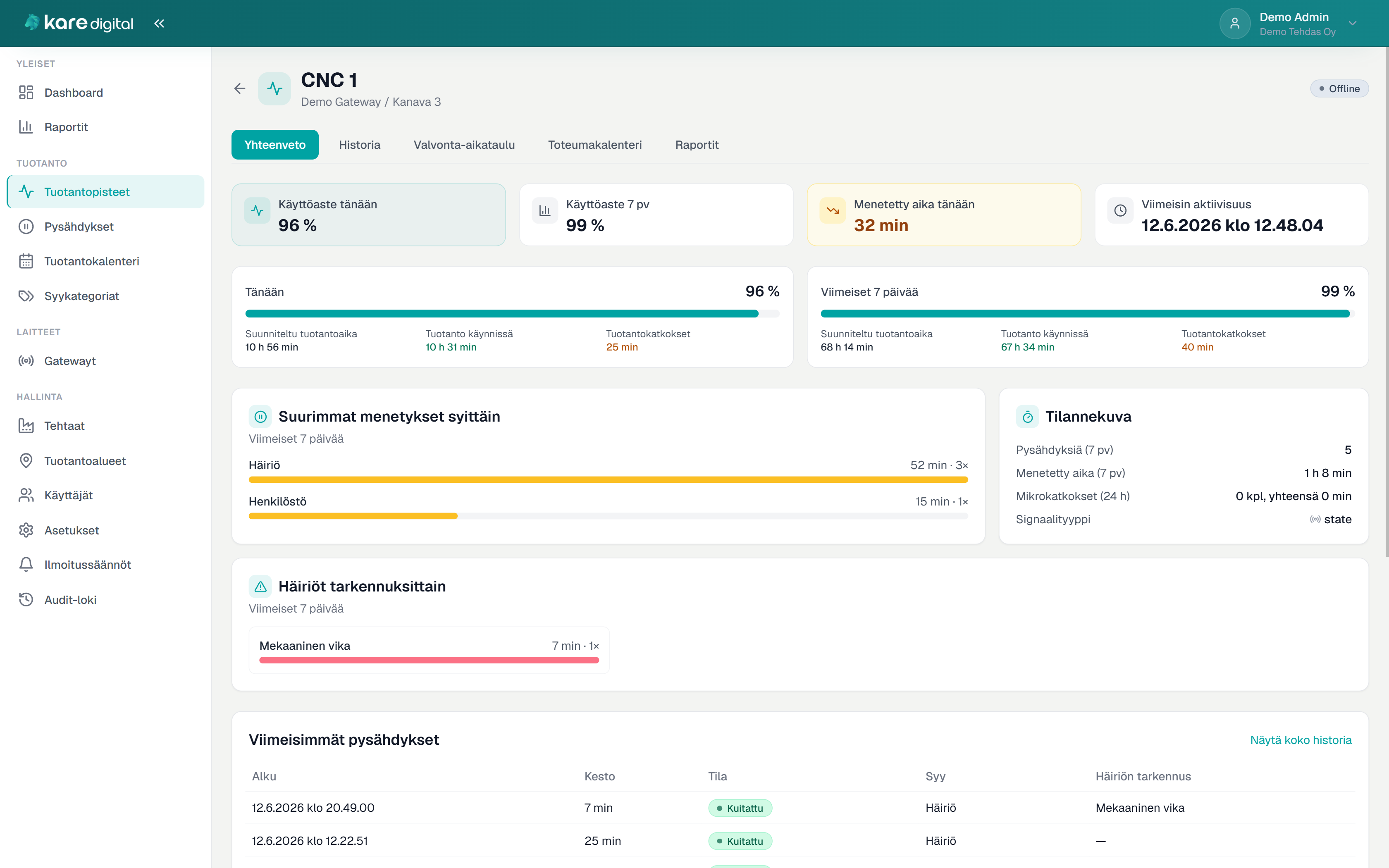
pulse.karehub.fi
Kare Pulse — production point

Production point summary — utilization, lost time, AI analysis, and unclassified stops
Kare Digital Kare Pulse

Who it is for

For manufacturing companies that need lost time visible quickly

Shop-floor production

Lines, cells, and machines. Runtime signals and PLC alarms from automation to software — utilization captured without manual logging.

  • Runtime signals and PLC alarms
  • Lost time daily and weekly

Production management

Plant-wide status at a glance: where production runs, where it stops, which alarms are active, and why time is lost.

  • Dashboard, alarms, and top losses
  • AI analysis for any period

Shifts and responsible users

Classify stop reasons according to responsibilities, or accept suggestions from alarm correlation. Reminders for unclassified stops.

  • Quick classification from the list
  • Mobile classification in the browser

Problem it solves

When lost production time stays invisible or relies on estimates

Typical current state

  • Production stops are not tracked reliably
  • PLC alarms do not reach production management
  • Stop reasons are not recorded systematically
  • Utilization is based on estimates, not measured actuals
  • A heavy MES project feels too big as a first step

Solution in practice

How Kare Pulse works day to day

1

Data from the field

Signals and alarms are collected from production and automation through on-site software connected to the network.

2

Automatic detection

The system creates stops from signals and stores alarms in history.

3

Reasons and classifications

Responsible users classify reasons, or the system suggests them from alarm correlation.

4

Analytics

Utilization, lost time, alarms, and reasons appear in reports and AI summaries.

Field connection

Data from the field to the network

Kare Edge is a software platform installed on a suitable on-site machine and connected to the network. It collects production signals and PLC alarms and sends them to Kare Pulse — without VPN or inbound ports opened in the customer network.

  • Signals and PLC connections from production
  • ADS, OPC UA, Modbus, and other protocols
  • Read-only to the automation network
  • HTTPS outbound from the customer network

Kare Edge is installed on a suitable machine for the situation — for example a PC, IPC, or server.

Software platform on the network
Kare Digital Kare Pulse

Features

From field to report — one whole

Monitoring and integrations

  • Run/stop monitoring per production point
  • PLC alarm collection
  • ADS, OPC UA, Modbus TCP/RTU
  • Field data via software platform

Classifications and reasons

  • Stop reason recording
  • Alarm–stop correlation
  • Automatic reason classification
  • Email reminders

Views and analytics

  • Dashboard for real-time status
  • Active alarms and history
  • Production calendar on a timeline
  • AI analysis for any date range

Structure and use

  • Factories, areas, and production points
  • Edge installation management from Pulse
  • HTTPS outbound from customer network
  • Complements MES/ERP/CMMS environments

Why Kare Digital

Industrial reality and lightweight onboarding — not a heavy MES project

  • Practical development from real shop-floor situations
  • No VPN or inbound open ports
  • Complements existing MES, ERP, or CMMS environments
  • On-site software and Kare Pulse as one solution
  • Support in Finnish and direct contact with the developer
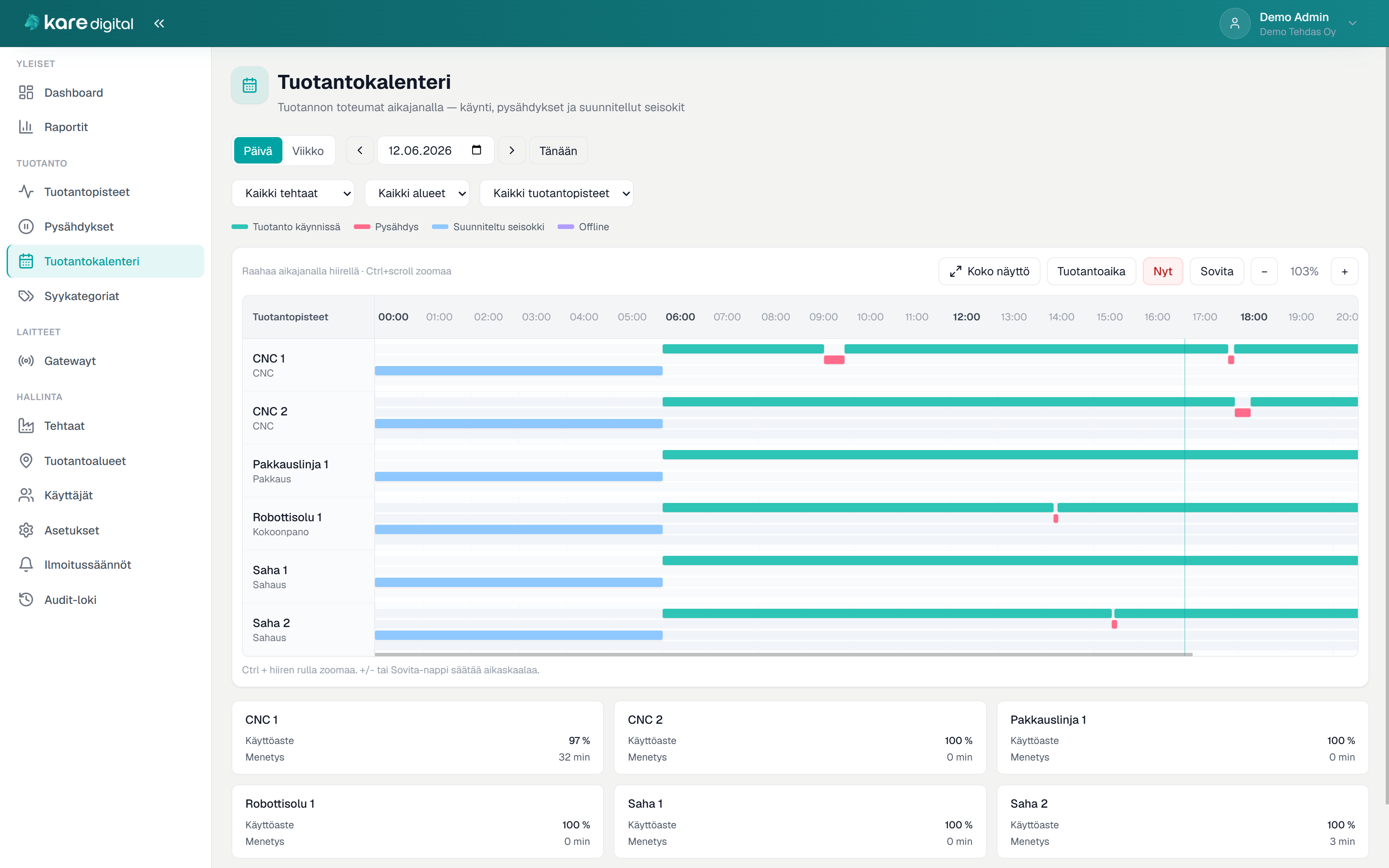
Kare Pulse — production calendar

Production calendar — signal chart separates running time, stops, and planned downtime